PHP 7.3 – 8.5 side by side
Every PHP-FPM version runs as its own supervised process; pick the version per vhost. Bundled extensions: APCu, Imagick, Memcached, Phalcon, Redis, Xdebug, YAML.
A native menu-bar app that installs and supervises Apache, PHP-FPM in every version you need, MySQL, Redis and phpMyAdmin — a free alternative to MAMP PRO. No Homebrew, no manual installs.

Two windows cover the daily work: the services and your vhosts. Everything else lives one click away in the menu bar.
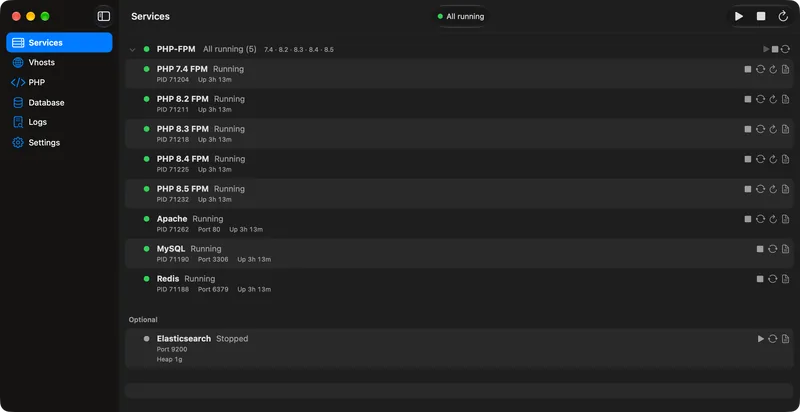
Main window — services
Status, start/stop and logs for Apache, every PHP-FPM version, MySQL, Redis and Elasticsearch, with OPcache and Xdebug switches next to them.
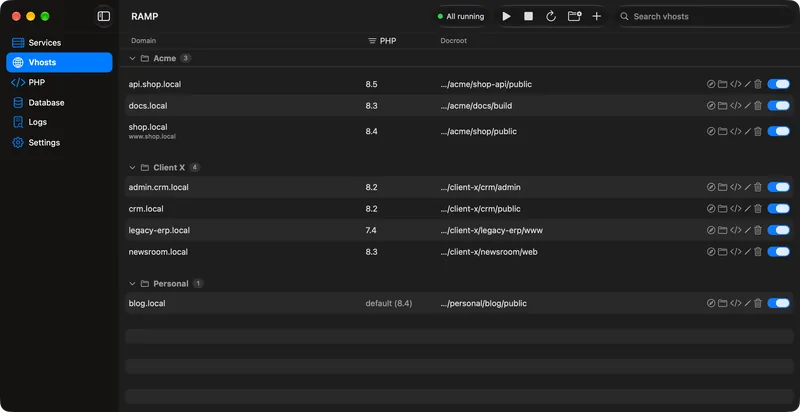
Vhost editor
Domain, aliases, document root and PHP version per host, organised in groups. RAMP writes the Apache config and the /etc/hosts entries for you.
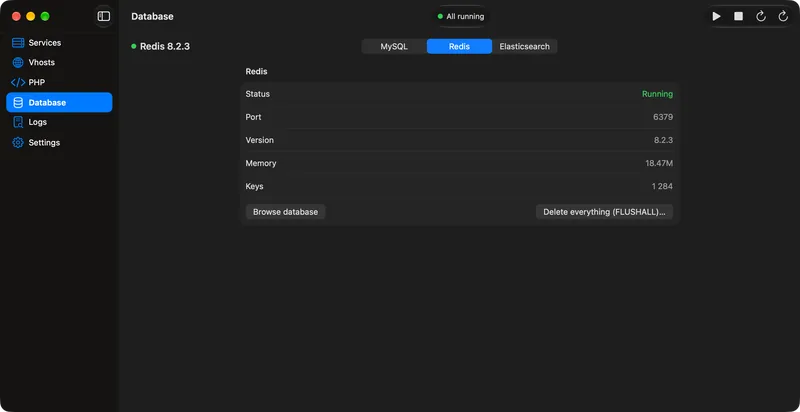
Database browser
phpMyAdmin and a lightweight Redis browser are one click away in the menu bar — no separate GUI to install.
Each service is a separate, relocatable arm64 build supervised by RAMP. Binaries live outside the app bundle, so they update independently.
Every PHP-FPM version runs as its own supervised process; pick the version per vhost. Bundled extensions: APCu, Imagick, Memcached, Phalcon, Redis, Xdebug, YAML.
Apache talks to PHP-FPM over Unix sockets via mod_proxy_fcgi, so PHP keeps running when Apache restarts.
Official MySQL build with binary logging off (skip-log-bin) and its data directory in RAMP’s own folder.
Redis as a supervised service; phpMyAdmin at localhost/phpmyadmin with automatic login over the local socket.
Optional and never auto-started. Stops itself after N hours or at a set time; adjustable heap, bound to 127.0.0.1.
Service status, start/stop, open localhost, logs, OPcache clear, Xdebug indicator and your vhost list — one click away.
Domain, aliases, document root and PHP version per vhost, in groups. A privileged helper maintains a marked block in /etc/hosts.
One php.ini baseline for every version, with global and per-version overrides. Xdebug stays off — not even loaded — until you enable it.
Reads your MAMP PRO vhosts, aliases and PHP versions and copies the MySQL data without binlogs. MAMP PRO’s files are never modified.
Services update side by side, are health-checked and roll back on failure, with a dump before MySQL major upgrades. The app updates via Sparkle.
Removes services, generated configs, databases (optional dump to the Desktop first), the hosts block and the helper. Project folders are never touched.
Every service is a prebuilt, relocatable arm64 package, downloaded and sha256-verified by the app. Includes the rampctl CLI for scripting.
RAMP runs the same everyday local stack with a different architecture, and imports an existing MAMP PRO setup in one click.
Each PHP version runs as its own supervised FPM service, so Apache restarts never restart PHP.
Brings over your MAMP PRO vhosts, aliases, PHP versions and MySQL databases. MAMP PRO’s own files stay untouched.
No license key, subscription or paid tier. Free for personal and commercial use, with the source open under MIT.
A SwiftUI app for Apple Silicon. No Homebrew needed — every package is verified by sha256 before it is installed.
Current service versions, straight from RAMP’s package manifest. New upstream releases are rebuilt and shipped as in-app updates.
| Service | Branch | Version |
|---|---|---|
| PHP | 8.5 | 8.5.12 |
| 8.4 | 8.4.27 | |
| 8.3 | 8.3.36 | |
| 8.2 | 8.2.35 | |
| 8.1 | 8.1.34 | |
| 7.4 | 7.4.33.1 | |
| 7.3 | 7.3.33 | |
| Apache httpd | 2.4 | 2.4.68 |
| MySQL | 9.7 | 9.7.2 |
| 8.4 | 8.4.11 | |
| Redis | 8.10 | 8.10.2 |
| phpMyAdmin | 5.2 | 5.2.3 |
| Elasticsearch | 9.5 | 9.5.4 |
| Elasticvue | 1.16 | 1.16.0 |
Manifest updated 2026-10-23. manifest.json
Requirements: macOS 27 or newer, Apple Silicon (M-series). Intel Macs are not supported.
Unzip the download, move RAMP.app to /Applications and open it. RAMP lives in the menu bar.
On first launch RAMP downloads the services from its manifest, verifies their checksums and installs them into ~/Library/Application Support/RAMP.
Enter your administrator password once and allow the helper in System Settings › General › Login Items & Extensions.
Stop MAMP PRO’s servers so ports 80, 3306 and 6379 are free, then run the import wizard from the first launch or Settings › Advanced.
Yes. RAMP is open source under the MIT license, made by Tyron s.r.o. There is no paid tier. The bundled services keep their own open-source licenses.
macOS 27 or newer on Apple Silicon only. Intel Macs, Windows and Linux are out of scope.
Both use ports 80, 3306 and 6379, so stop MAMP’s servers before starting RAMP. The import never modifies MAMP’s files, so you can go back any time.
Vhosts, aliases, document roots and the PHP version per host, plus your MySQL databases: the data directory is copied without binlogs and upgraded 8.0 → 8.4 → 9.7 in RAMP’s own datadir (with a per-database mysqldump fallback). The import is resumable.
No. SSL on localhost only adds friction, and RAMP uses Apache like typical production servers. Both are deliberate non-goals.
No. RAMP is self-contained — every service is a prebuilt, relocatable arm64 package downloaded and verified by the app.
Any name under a configurable TLD (default .local). RAMP writes both 127.0.0.1 and ::1 for each host into its own marked block in /etc/hosts, avoiding slow mDNS lookups.
Service updates are checked at launch against the manifest, installed side by side, health-checked and rolled back on failure. The app itself updates through Sparkle with a signed appcast.
Use the in-app uninstall: it removes services, generated configs, databases (with an optional dump to your Desktop), the hosts block, the helper and the login item. Your project folders are never deleted.
One short email when a new RAMP version ships, with what changed. No marketing; unsubscribe with one click.